
Guide updated 19th December 2025.
Frank Herbert’s seminal sci-fi novel Dune is set in a science fiction universe where computers are religiously outlawed due to an artificial intelligence led rebellion. Conventional warfare with guns, projectiles and explosives is obsolete due to the invention of impenetrable, wearable force-fields. It’s fair to say then, that most of the Dune computer games take some artistic license with the source material. Emperor – Battle for Dune is the sequel to the genre-defining Dune II. The game was generally well received, but criticised by some for failing to innovate or move the genre forward in any meaningful way. Nevertheless, if you hanker for some old-school RTS action and prefer the sci-fi setting of the desert planet Arrakis to the battlefields in Command and Conquer, then then Emperor – Battle for Dune is unlikely to disappoint.
Installation
When we last visited this game in 2017 we remarked on how difficult it was to get working on modern computers due to it’s use of an outdated copy protection mechanism. While we were able to coax the game into running back then, unfortunately that wasn’t the case for our new Windows 11 machine. The game would install, but stubbornly refuse to run.
Fortunately, however, the internet has come to the rescue once again, thanks to a completely new installer and patch written by one Tom Mason. The patch (along with extensive notes for anyone curious as to what it took to fix this old game) can be downloaded here.
To use the launcher, simply extract it to any suitable empty directory on your PC and run “EmperorLauncher.exe”. The program will then install the game to wherever you placed it. We recommend using a directory such as C:\Games\Emperor, not the “Program Files” or “Program Files (x86)” folder.
If you have an installation of Emperor Battle for Dune already, note that you need to uninstall it and reinstall it using the launcher. You can keep any save games you’ve made in the past though.
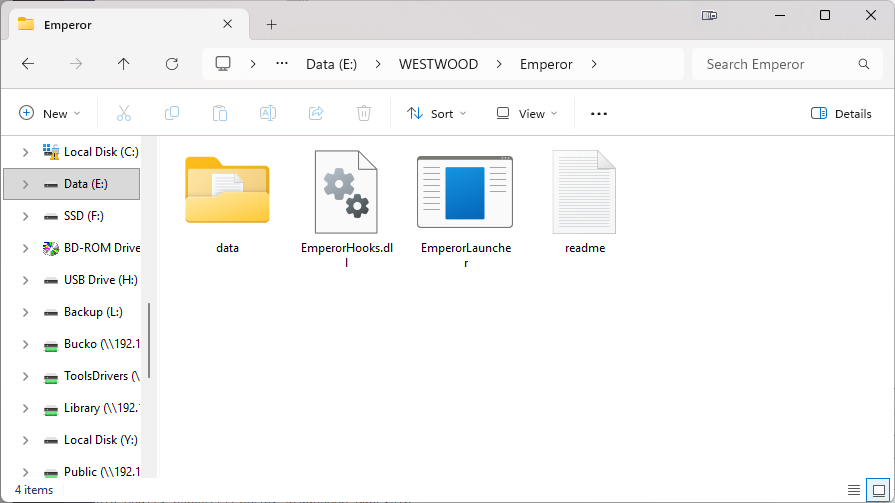
Once the game is installed, you can start it by running the “EmperorLauncher” program again. The updated installer even adds multiplayer capacity back into the game.
Tweaking graphics settings
Graphical settings are now all configured by EmperorLauncher and we do not recommend changing them. This game launched in the year 2001, so even a budget PC can comfortably run it on maximum graphical quality settings.
If you’re planning to play the game on your HDTV rather than computer monitor, you might want to run the game at a lower screen resolution since the games text is very small when running in higher resolutions. Rather than changing the resolution in-game (which no longer works) set your desktop to the desired resolution before starting the game. Running in a lower resolution will, of course, result in less detailed graphics, but at least game text is then legible.
Multiplayer and other notes
The internet multiplayer service for Emperor – Battle for Dune shut down a long time ago. However, the new patch from Tom Mason should re-enable this, if you can find anyone to play with.
You can also play over your local network with other PCs in your home by selecting LAN mode. The patch also restores the co-op campaign mode, which for some reason could only be played over the internet before.
There is a map editor and various mods for the game available here.
Screenshots
Click on any screenshot to enlarge it.

I’m having a different install issue. As soon as the installation progress bar starts, it tells me it cannot locate Game1.cab and fails installation. The file is there located in the INSTALL folder of the CD.
Perhaps a scratched CD?
https://www.mediafire.com/file/hiziumtpq49c36n/Emperor.7z/file
WORKING WIN10 BE HAPPY!
*** Editors note – We are not responsible for any content in remote links, use at your own risk ***
If you have more than one CD (or DVD/CDRW) drive (real or virtual), make sure Emperor disk 1 is in the first CD drive, otherwise you will get that error!
I can’t typing CD key In installation procedure, It’s get stuck.
and I don’t know why :(
Hi guys my copy of emperor. I click install and it asked me if I would like to make changes. I click yes and then it’s as if it all closes and does nothing. Any ideas
I too am encountering this problem
Hey Aaron exact same issue here. Used the EMPEROR_INSTALL_FIX_1.0 solution and the installation progress bar stalls at 0% with “Could not read from the file Game1.cab” No idea how to fix this.
Any help would be fantastic! Been trying to revive Emperor on my PC ever since Windows 10 messed it up. So many disappointing failed attempts…. :(
These instructions no longer seem to work. Tried every variation of every instruction here and nada. Been trying for months to get this game to work, and nothing does it. RIP the best RTS ever.
Hey Ogre, did you ever get it to work? Also been trying to revive this game as it was my favorite RTS as a kid but I just can’t get it to work. Super saddening.
What exactly was your issue? And I do mean E X A C T L Y.
Thank you for this, Emperor is my favourite game and it’s adelight to return.
After the Westwood logo is finnished the game exit out to windows.
Any advise?
Yes. Use dgVoodoo2
It really was, I miss this game so much. There is still a small follower and ive considered buying old computers to be able to play it.
Pingback: Emperor Battle of Dune in virtueller Maschine spielen? - eKiwi-Blog.de
There’s actually an official NoCD patch here:
https://forum.dune2k.com/files/category/6-patches/
Download the “EMPENGINSTFIX10.zip” file and use the included EMPEROR.EXE.
(It’s down to 92kb from 927kb, the rest apparently was only the SafeDisk copy protection.)
I am beginning to think..that ALL this work..is really, REALLY not worth the effort..”Action not supported”-This…another Frakking annoying thinghy-ThaT! This is why..i REALLY hope for…that GOG, Steam, Origin..or SOMEONE..would please get off their big butt, and make a full working Emperor Battle For Dune for Win10 and so forth..with NO errors! I would GLADLY pay for it!!!
They can’t the herbert estate hates the games and wishes they were never made. When EA’s rights to the Dune expired that was the end. The herbert estate refuses to give the rights to anyone to do a re-release.
The game works fine in Windows 10 and Linux in 2021. Just follow the instructions closely.
At the point where it says insert the CD labeled. (Which Cd does it want lol
Hey, make sure you go into the cd and use compatibility mode back to ME. that worked like a charm plus the patch etc above. been playing for the last few hours….